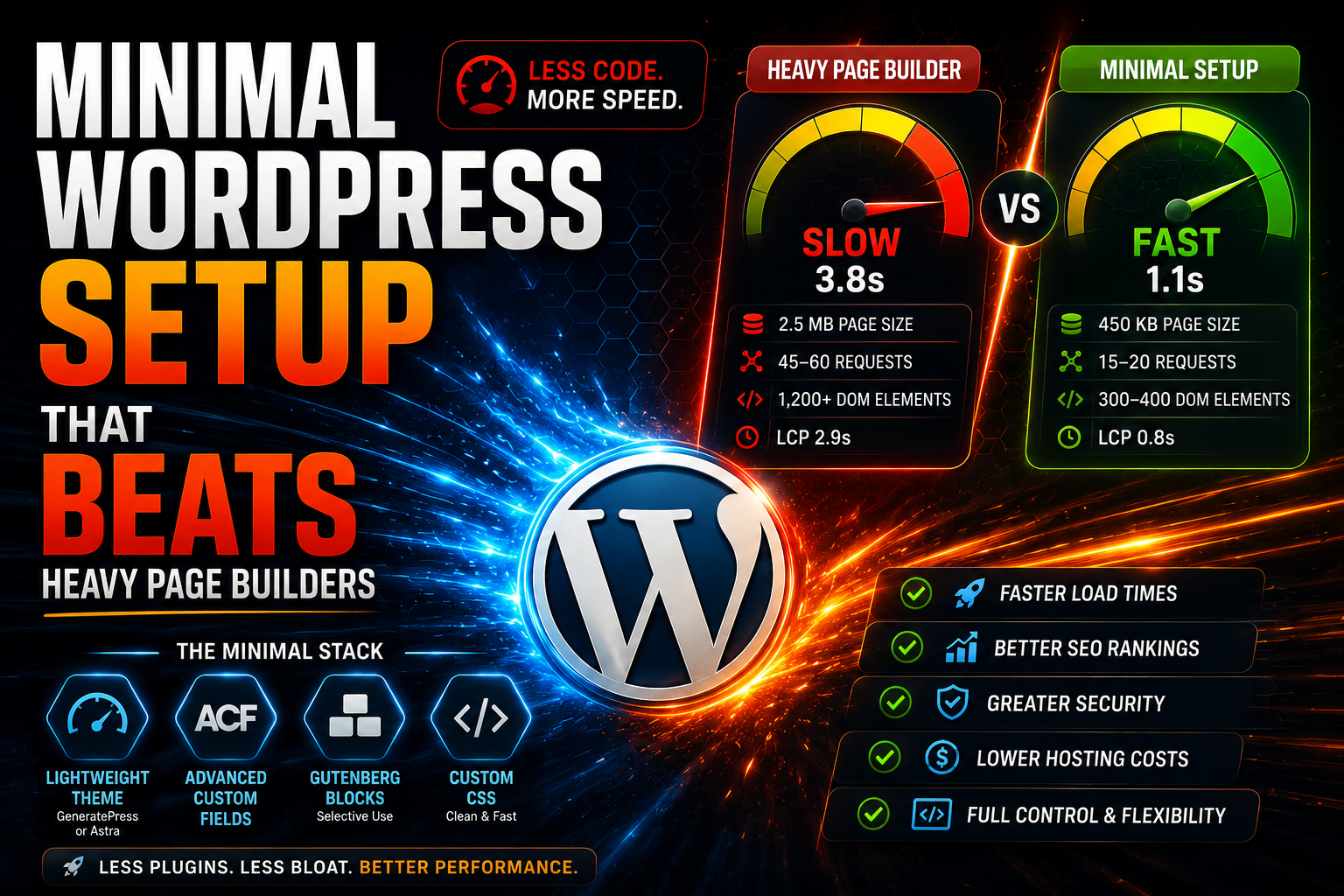
WordPress site speed is a critical factor for both user experience and search engine optimization. Many page builders like Elementor and Divi offer impressive visual capabilities, but they often come at a significant performance cost. In this article, I’ll present a minimalist WordPress setup that outperforms heavy page builders in speed without sacrificing functionality.
Why Heavy Page Builders Slow Down Your Site
Elementor, Divi, and similar page builders typically load 500 KB – 2 MB of extra JavaScript and CSS code on every page. They create complex div structures, add inline styles, and require numerous HTTP requests. The result is a site whose loading time can easily exceed 3-5 seconds, negatively impacting Google Core Web Vitals scores.
Tests show that an Elementor-based homepage can generate 50-100+ DOM elements and load 15-20 separate CSS and JavaScript files. For a simple blog post or product page, this overhead is completely unnecessary.
The Minimal Setup Components
1. Lightweight Theme: GeneratePress or Astra
Instead of a page builder, choose a lightweight theme designed for performance. GeneratePress weighs only ~30 KB, while Astra comes in at around 50 KB. Both offer:
- Clean, semantic HTML code
- Minimal CSS and JavaScript
- Native WordPress customizer integration
- Excellent mobile responsiveness
- Built-in schema markup
GeneratePress Premium adds powerful hooks and elements system that lets you customize layouts without bloat. You can create custom headers, hero sections, and content blocks using simple PHP and CSS.
2. ACF (Advanced Custom Fields) for Flexibility
For custom content layouts, Advanced Custom Fields provides the perfect solution. Instead of dragging and dropping widgets, you define custom fields that content editors fill in. Benefits include:
- Zero front-end JavaScript in most cases
- Complete control over HTML output
- Reusable field groups
- Conditional logic without performance penalty
- Developer-friendly code structure
A hero section that might require 200 KB with Elementor can be built with ACF using just 5-10 KB of custom CSS and clean HTML.
3. Gutenberg Blocks (Selective Use)
WordPress’s native Gutenberg editor has matured significantly. For basic content layouts, use core blocks or lightweight block plugins like:
- Stackable – Advanced blocks with performance in mind
- Kadence Blocks – Feature-rich but optimized
- GenerateBlocks – Minimal container and grid system
The key is selecting blocks that load CSS only when used, not globally on every page.
4. Custom CSS Instead of Visual Styling
Rather than using page builder styling panels that generate bloated inline CSS, write custom CSS in your theme or child theme. This approach:
- Enables browser caching
- Minifies easily
- Keeps HTML clean
- Allows for advanced responsive design
- Reduces DOM size dramatically
A simple custom CSS file of 20-30 KB can replace hundreds of kilobytes of page builder styling.
Performance Comparison: Real Numbers
Here’s a comparison based on typical implementations:
Heavy Page Builder Setup (Elementor):
- Page size: 2.5 MB
- Requests: 45-60
- DOM elements: 1,200+
- Load time: 3.8 seconds
- Largest Contentful Paint: 2.9s
Minimal Setup (GeneratePress + ACF):
- Page size: 450 KB
- Requests: 15-20
- DOM elements: 300-400
- Load time: 1.1 seconds
- Largest Contentful Paint: 0.8s
The minimal setup is over 3x faster and passes Core Web Vitals with flying colors.
Building Common Layouts Without Page Builders
Hero Section
With ACF, create fields for heading, subheading, background image, and CTA button. Output with a simple PHP template:
php
<section class="hero" style="background-image: url(<?php echo get_field('hero_image'); ?>);">
    <div class="container">
        <h1><?php echo get_field('hero_heading'); ?></h1>
        <p><?php echo get_field('hero_subheading'); ?></p>
        <a href="<?php echo get_field('cta_link'); ?>" class="btn">
            <?php echo get_field('cta_text'); ?>
        </a>
    </div>
</section>
Add 20 lines of CSS for styling, and you have a hero section that loads in milliseconds.
Feature Grids
Use ACF Repeater fields to create flexible feature sections. The output is clean HTML that can be styled with CSS Grid or Flexbox, requiring no JavaScript.
Pricing Tables
Rather than using a page builder’s pricing table widget, create an ACF field group with price, features list, and highlight options. Style with pure CSS for a responsive table that loads instantly.
Essential Plugins for the Minimal Stack
Keep your plugin list lean:
- AIOSEO or Rank Math – SEO optimization
- WP Rocket or LiteSpeed Cache – Caching and optimization
- Advanced Custom Fields Pro – Custom fields
- WPForms Lite – Contact forms
- UpdraftPlus – Backups
- Wordfence – Security
This gives you complete functionality with 6 plugins instead of 15-20.
When You Might Still Need a Page Builder
The minimal approach works best for:
- Business websites
- Blogs and content sites
- Portfolio sites
- Simple e-commerce stores
You might still want a page builder if:
- Clients need absolute visual control without code
- You’re building highly custom landing pages weekly
- Your team has no technical skills whatsoever
However, even in these cases, consider using a lighter builder like Oxygen or Bricks rather than Elementor or Divi.
Migration Strategy
Moving from a page builder to a minimal setup requires planning:
- Audit your current site – Identify which pages actually need complex layouts
- Create ACF field groups – Build flexible content structures
- Design reusable templates – Use GeneratePress Elements or custom templates
- Migrate page by page – Don’t rush; test each conversion
- Implement redirects – Ensure URLs remain consistent
- Optimize and test – Use PageSpeed Insights and GTmetrix
The migration might take 1-2 weeks for a small site, but the long-term performance gains are worth it.
Long-Term Benefits
Beyond immediate speed improvements, a minimal setup offers:
- Lower hosting costs – Faster sites use fewer server resources
- Better SEO rankings – Google rewards fast, clean sites
- Easier maintenance – Fewer plugins mean fewer conflicts and updates
- Improved security – Smaller attack surface
- Greater flexibility – You control the code completely
Conclusion
Heavy page builders promise ease of use but deliver sluggish performance that hurts your bottom line. A minimal WordPress setup with GeneratePress or Astra, Advanced Custom Fields, and selective use of Gutenberg blocks can achieve the same visual results with 3-5x better performance.
The initial learning curve is slightly steeper, but the payoff in speed, SEO rankings, and user experience makes it worthwhile for anyone serious about their WordPress site’s success. Your visitors will appreciate the instant loading, and Google will reward you with better rankings.

 Limited-Time Offer