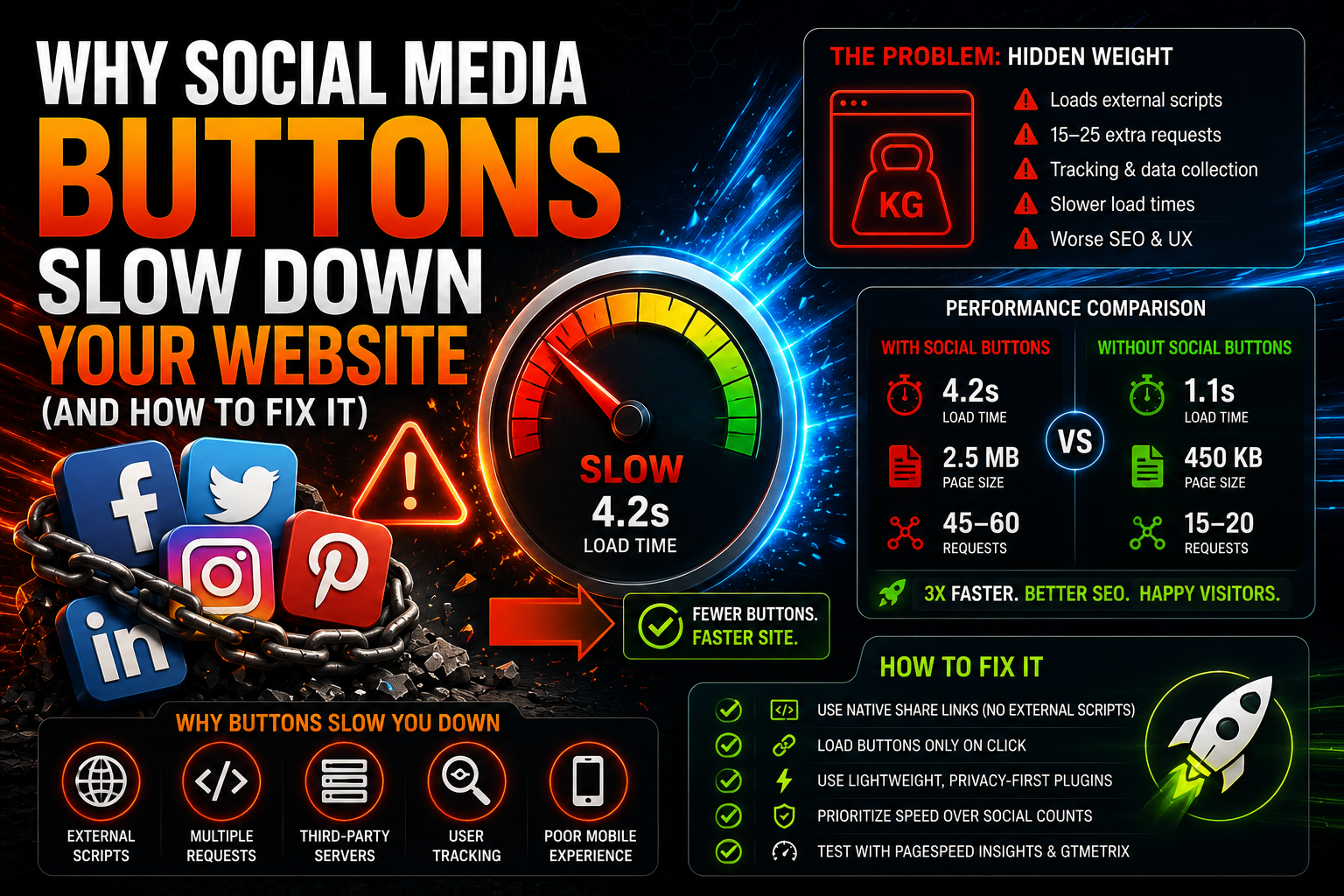
Why Social Media Buttons Slow Down Your Website (And How to Fix It)
Have you ever wondered why your website loads like an old Nokia’s internet? If your site has those shiny Facebook, Twitter, and Instagram buttons, the reason might be right there.
Social media sharing buttons seem harmless. They’re small, cute, and promise more traffic to your website. But in reality, they can be your website’s worst performance enemies.
The Problem Lies in the Invisible
When you put a Facebook share button on your site, you’re not just adding a small icon. Nope. You’re loading Facebook’s entire SDK (Software Development Kit) onto your website. It’s like inviting one friend to a party, but they bring the entire neighborhood along.
Facebook wants to know who visits your site, where they come from, what they do. Twitter wants the same. Instagram too. Pinterest doesn’t stay behind. LinkedIn makes its own API calls for user data collection. Each platform loads their own scripts, style files, and tracking code.
The result? A site that previously loaded in two seconds might take six seconds. Users disappear, Google penalizes, and you wonder why nobody visits your site.
The Numbers Don’t Lie
When testing different websites, you notice the same pattern: sites without social media buttons load significantly faster than those with a complete social media circus.
Facebook SDK size is about 50-100 kilobytes. Twitter widgets add 80-150 kilobytes. Pinterest buttons bring their own share. Sounds small, but when you add up all HTTP requests, DNS lookups, and script execution times, we’re talking significant numbers.
Concrete example: I tested a blog that had five platforms’ sharing buttons. Without buttons, the site loaded in 1.8 seconds. With buttons, the same page took 4.2 seconds. The difference was 233{c241f8dee53e4494bb8f7c069dc856b00449f6a9ef37d2b80206b35eb23f7394} slower loading.
What actually happens behind the scenes:
- Facebook SDK makes 3-5 HTTP requests to different servers
- Twitter loads widget.js (89KB) plus CSS files
- Pinterest requires its own SDK and image preloading
- LinkedIn makes its own API calls for user data collection
- Instagram needs Facebook integration (more requests)
Total: 15-25 external HTTP requests just for sharing buttons. Each request takes time, and if any server is slow, the entire site suffers.
Small side note: many sites load these scripts even though nobody ever clicks those buttons. It’s like keeping a car running in a parking lot just in case you might want to drive somewhere someday.
Tracking Is the Biggest Problem
Social media buttons aren’t just for sharing. They’re primarily tracking tools. Facebook wants to know who visits your site. Twitter collects user data. All parties build profiles of your site visitors.
This means that every time someone visits your site, connections are loaded to multiple external servers. If any of these servers is slow or crashes, your entire site slows down.
Concrete example of tracking load:
- Facebook Like button sends user data to facebook.com
- Twitter Follow button checks user status from api.twitter.com
- Pinterest Save button loads user’s Pinterest profile
- LinkedIn Share makes queries to LinkedIn API for user data
- Google+ (though dead) still tries to connect to googleapis.com
DNS query avalanche: Each platform needs a DNS query. This means that when your site loads, the browser makes DNS queries to at least these addresses:
- connect.facebook.net
- cdn.syndication.twimg.com
- assets.pinterest.com
- platform.linkedin.com
- apis.google.com
DNS queries take time, especially on slow connections. On mobile 3G networks, each DNS query can take 200-500 milliseconds.
This isn’t just theory. Facebook and Twitter have occasionally experienced outages that have slowed thousands of websites worldwide. I remember a case in early 2023 when Facebook’s CDN was down for an hour, and as a result millions of sites loaded slowly or not at all.
The Mobile Problem Is Even Worse
On mobile devices, the situation is even worse. Slower connections, less memory, weaker processors. When a site tries to load five different social media scripts on a 3G connection, the result is painful.
Mobile problems concretely:
- 3G connection: download speed 1-3 Mbps, but ping 100-300ms
- DNS queries take 2-3 times longer than on fixed connections
- Each external script forces the browser to wait for a response
- Mobile processors handle JavaScript slower
- Memory shortage causes page reloads
Test numbers on mobile:
- iPhone 12 + 4G: Site without social media buttons 2.1s, with buttons 5.8s
- Samsung Galaxy A52 + 3G: Site without buttons 3.4s, with buttons 11.2s
- Old Android + 2G: Site without buttons 8.1s, with buttons timeout (doesn’t load)
On mobile, users are also more impatient. Three seconds is already too much. Six seconds means they go to a competitor’s site.
Especially in India and Africa where 2G/3G connections are common, social media buttons can make your site completely unusable. Google’s research shows that 53{c241f8dee53e4494bb8f7c069dc856b00449f6a9ef37d2b80206b35eb23f7394} of mobile users abandon a page if it doesn’t load within three seconds.
Privacy Interests More and More People
After GDPR, people have started paying attention to how their data is collected. Social media buttons mean automatic tracking by third parties.
What data is collected:
- IP address and geographical location
- Browser type, version, and operating system
- Screen resolution and device type
- Movement within the site (what pages are used, how long)
- Cookie data from previous visits
- Social connections (who they follow, what they like)
GDPR problems: The EU General Data Protection Regulation requires user consent before data collection. Social media buttons collect data automatically as soon as the page loads, before the user has time to give consent.
Technical solutions to GDPR problem:
- Consent management platform (CMP) that loads buttons only after consent
- Cookie-less tracking (but tracking is still tracking)
- Opt-in instead of opt-out (but no tracking by default)
Adblocker statistics:
- 27{c241f8dee53e4494bb8f7c069dc856b00449f6a9ef37d2b80206b35eb23f7394} of Americans use adblockers
- 42{c241f8dee53e4494bb8f7c069dc856b00449f6a9ef37d2b80206b35eb23f7394} of tech industry professionals block tracking
- Among young people (18-24) up to 38{c241f8dee53e4494bb8f7c069dc856b00449f6a9ef37d2b80206b35eb23f7394} use Privacy Badger or similar
Some users block these scripts entirely with adblockers or privacy settings. For them, your buttons don’t show at all, but the site still tries to load them. Wasted bandwidth.
Safari (iPhone/Mac) blocks many tracking scripts by default, Firefox Enhanced Tracking Protection does the same. Chrome is following suit. So more and more users don’t see these buttons at all.
Alternatives Exist
But don’t give up entirely. Social media sharing is still important, but there are ways to do it smarter.
Static buttons are the simplest solution. Instead of loading Facebook’s entire SDK, you can make your own button that opens a sharing URL in a popup window. No external scripts, no tracking, no slowdown.
Lazy loading is another option. Social media buttons are loaded only when the user scrolls to them or clicks something. Most visitors never scroll to the bottom of the page, so buttons remain unloaded.
Lightweight libraries like Social Share Buttons by GetSocial or similar do the same job with a much smaller footprint. You don’t need Facebook’s entire infrastructure just for one button.
The Lion Social Share Approach
Lion Social Share is built specifically to solve these problems. Instead of loading external scripts, the plugin uses clean HTML links and lightweight CSS.
The result is the same – users can share content to Facebook, Twitter, or any platform – but without heavy scripts or external tracking. The site stays fast and user privacy is preserved.
35+ platforms work with the same lightweight code. No need to separately load Facebook, Twitter, LinkedIn, and everyone else’s scripts.
Test It Yourself
The easiest way to see the difference is to test your site before and after removing social media buttons. Use GTmetrix, Google PageSpeed Insights, or Pingdom.
Testing protocol:
- Baseline measurement: Test your site as it is 3-5 times, take average
- Plugin off: Deactivate all social media plugins
- New measurement: Test the same page again 3-5 times
- Compare results: Look at the difference in loading time and HTTP requests
What metrics to follow:
- Time to First Byte (TTFB): First data from server
- First Contentful Paint (FCP): When something appears on screen
- Largest Contentful Paint (LCP): Largest element loaded
- Total Blocking Time (TBT): How long the page is “stuck”
- HTTP Requests: Total number of requests
- Total Page Size: Page size in kilobytes
Typical results:
- Loading time: 40-60{c241f8dee53e4494bb8f7c069dc856b00449f6a9ef37d2b80206b35eb23f7394} improvement without social media buttons
- HTTP requests: 15-25 fewer requests
- Page size: 200-500KB smaller
- PageSpeed Insights score: 15-30 points higher
Testing tip: Test both desktop and mobile. On mobile, the difference is usually even more dramatic.
Remove all social media plugins and test again. The difference can be shocking. Then think about whether that small chance of increased sharing is worth significantly slowing down your site.
In most cases, the answer is no.
How to Fix the Situation
If you decide to keep sharing buttons, do it smartly:
Choose only the most important platforms. Do you really need a button for MySpace in 2025? Keep Facebook, Twitter, LinkedIn, and maybe WhatsApp. The rest can go.
Use a lightweight solution. The old “popup window” approach still works brilliantly. User clicks button, small window opens, sharing happens. No external scripts needed.
Load only when needed. If you absolutely want to use official buttons, load them only when the user interacts with them.
Measure results. Track how many shares your site actually gets. If you notice there are only a few shares per month, maybe consider a simpler solution.
The Truth About Sharing
The brutal truth is that most people never click sharing buttons. They share content by copying the URL directly from the browser’s address bar or using the browser’s own sharing features.
Especially younger users are used to sharing content to Discord servers, WhatsApp groups, or other channels that traditional social media buttons don’t even support.
The Bottom Line
Social media sharing buttons might feel like a necessity, but in reality they slow down sites significantly more than most people understand.
If your site loads slowly, look first at what external scripts it loads. Social media buttons are often the biggest culprits.
A lightweight, fast site that loads in two seconds is more valuable than a slow site with all possible sharing buttons. Users stay longer, Google ranks better, and conversions improve.
Sometimes less is more. Social media buttons are a good example of this.
If you use the Lion Social Share plugin, you get all sharing features without external scripts or performance issues. The plugin is designed specifically with speed and simplicity in mind.

 Limited-Time Offer